
We offer multiple ways to check on how your campaign is pacing ot fulfill the total number of impressions you ordered.
Our team paces to calendar month impression goals. For example, you purchased 100,000 impressions from Dec. 1 - Dec. 31, we will aim to serve all 100,000 of those impressions by end of day on Dec. 31, as evenly as possible.
We monitor all of our campaigns to ensure we are on "pace" to fulfill the ordered impressions by the applicable end date and that we don't deliver all of the impressions in a single day.
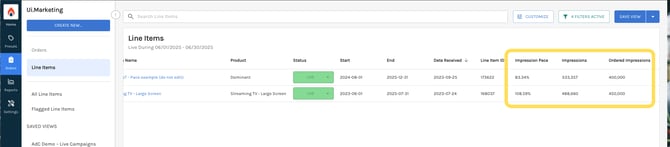
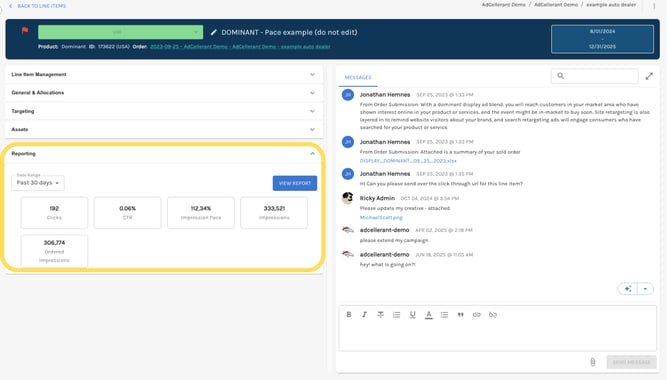
You can also see how your line items are pacing within Ui.Marketing. We have two places to view this data:
- On the Line Items table
- Within a line item under "Reporting"
Impression Pacing Metrics
Impressions
This is the total number of impressions served during the date range selected. For example, if you have a date range of "Past 30 Days", this would be the number of impressions served over the last 30 days. For example, over the last 30 days, you served 112,234 impressions.
Impression Allocations
These are the number of impressions that are purchased per allocation that our team will try to fulfill and what you will be billed on. These can be found within a line item under the "General & Allocations" card.
For example, in the screenshot below, you will see allocations as each individual row. So from 12/1/2025 - 12/31/2025, you purchased 300,000 impressions and that is what our team will try to serve as evenly as possible and fulfill upon by end of day 12/31/2025.

Ordered Impressions
Ordered impressions is needed to help us calculate our impression pace. The formula for Ordered Impressions is:
(Impression Allocation/ # of Days in Allocation Period) * # of Days Campaign is Live Within Selected Period
For example, if you have a date range of Dec. 1 - Dec. 20, and there impression allocation that spans from Dec. 1 - Dec 31 with a goal of 300,000 the formula would be:
(300,000 / 31 ) * 20 = 193,548 Ordered Impressions
Impression Pace
Impressions pace is how we know if we are going to over or under deliver on what you ordered. Anything over 100% means we will over delivery by the percentage over 100%. Anything under 100% means we will under deliver and are on pace to only fullfill that much of what you ordered.
For example, if you ordered 300,000 impressions and our impression pace is 110%, we will over delivery by 10% = 30,000 impressions. On the other hand, if you ordered 300,000 impressions and our impression pace is 90%, we are track to only fulfill 90% of the 300,000 impressions and will be short by 30,000 impressions.
If your campaign over delivers, we will not charge you for the extra impressions!
Here is how we calculate impression pace:
( (Impressions Served / Days Live) * # of Days in Allocation Period) / Ordered Impressions
For example, if you have impression allocations of 300,000 impressions from Dec. 1 to Dec. 31, and today is Dec. 20, and your campaign as served 225,000 impressions:
( ( 225,000 / 19 ) * 31 ) / 300,000 = 122.37% Impression Pace
‼️ Days live in the above calculation does not include the current day you are on. Therefore, if today was Dec. 20, you would use "19 days live" in your calculation.