
Amazon Pro is only available in the US.
Accessing Amazon Pro Reporting
To access Amazon Pro reporting, follow these steps:
- Navigate to https://ui.marketing/reports
- Using the filters on the left-hand side, filter down to the report you want to the advertiser you want to see reporting for.
- Under the Product filter, select Amazon Pro to view Amazon Pro-specific reporting.
Amazon Pro Charts
Snapshot
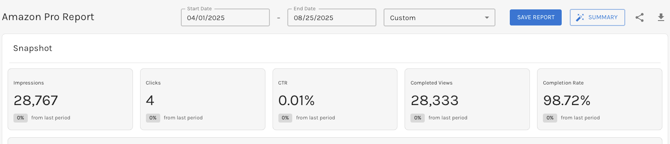
The Amazon Pro Snapshot will display the following performance data and PoP metrics for your selected date range.
|
|
Data by Time Frame
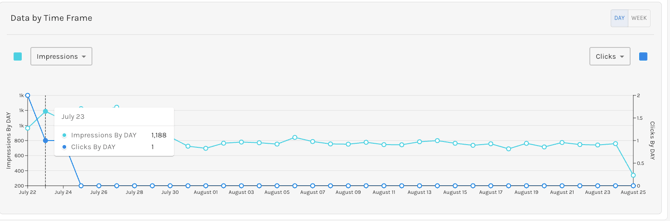
The Amazon Pro Data by Time Frame chart allows users to see their performance on a daily or weekly basis across the time frame selected.
Click the dropdowns to choose the data points you wish to compare. The default view will compare Impressions vs. Conversions but you can also compare clicks, completion rate, and completed views. Additionally, you can toggle to view the metrics broken out by week if you are viewing a report longer than 21 days.
Performance by Campaign

The Amazon Pro Performance by Campaign table is an advertiser-level report that breaks out the performance of each underlying campaign based on the selections made in the sidebar. To see campaign-specific metrics just click on the campaign name.
This chart also appears on a campaign report, where you can view how each Ad Group is performing.
Geography
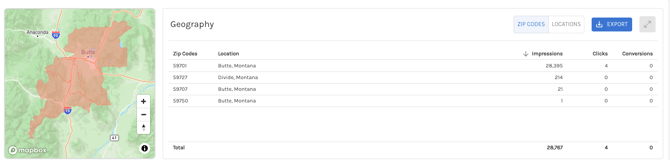
Users have the ability to view how their target locations are performing, broken out by zip codes and locations, which they can toggle between.
Top Performing Channels
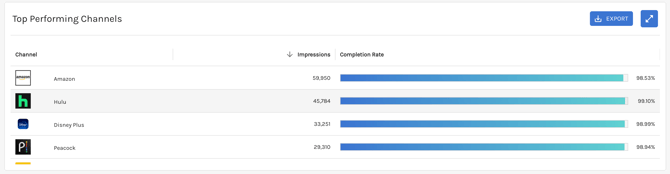
The Top Performing Channels table will show you the number of impressions and completion rate (for Video/Audio campaigns) by each channel or site where your ads have served.
ℹ️ You may see "Other" as a channel; this is simply an aggregate of other channels where your ads were served. To get a full site list, please reach out to your Campaign Manager.
Device Type

Utilize the Device Type table to see impressions and completion rate (for Vidoe/Audio campaigns) by device.
Performance by Creative
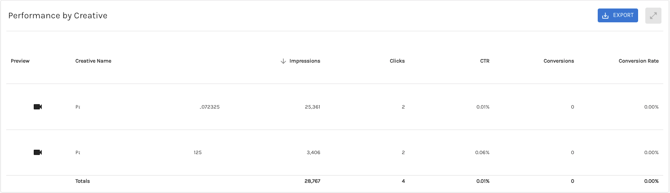
The Performance by Creative table allows you to see how each creative is performing. You can easily sort the columns. This chart also appears on a campaign level and ad group level reporting.
Audience
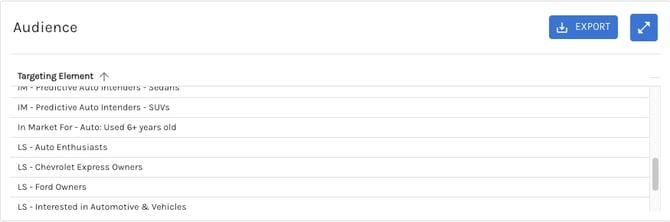
The Audience chart showcases the audience segments we are targeting within Amazon for your campaign. You may see acronyms before the target element name below is a quick glossary of what those stand for:
- IM = In Marketing
- LS = Lifestyle