
Report Breakdown
*Period: Previous Month
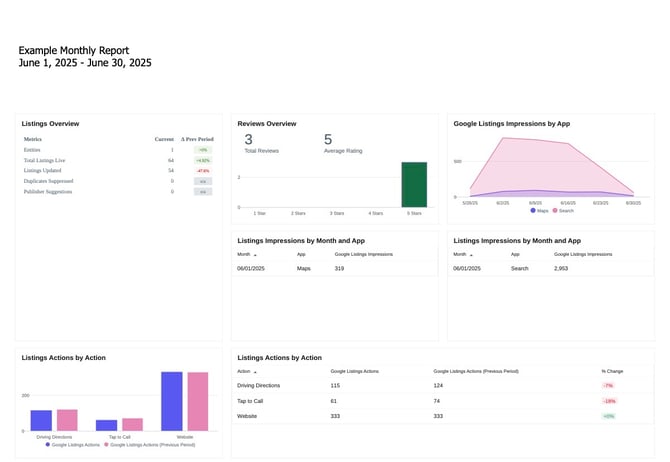
1. Listings Overview Chart
- Entities: Number of locations tracked in the report.
- Total Listings Live: Number of online directory listings active for your business.
- Listings Updated: How many listings had changes or updates made
- Duplicates Suppressed: Duplicate listings identified and hidden from users.
- Publisher Suggestions: Suggestions made by platforms like Google to modify the listing.
Why this matters: A higher number of live and updated listings means more accurate and consistent information about your business across the webInsight Dashboard.
2. Reviews Overview Chart
- Total Reviews: Reviews received during this period.
- Average Rating: Average rating of reviews received during this period.
Why this matters: Reviews influence local SEO and customer trust. Maintaining high ratings boosts your visibility and actions.
3. Google Listings Impressions by App Chart
- Search: A user found the listing via a Google Search.
- Maps: A user found the listing via a Google Map Search.
- Graph View: The chart shows impression pacing over time.
Why this matters: These impressions show how often users are discovering your business in Google Search and Google Maps. Spikes may correlate with promotions or other activity.
4. Listings Impressions by Month and App Chart
This section shows what actions Google users took after seeing your listing within the period.
- Driving Directions
- Tap to Call
- Website Clicks
- Food Menu Clicks (if applicable)
- Reservations (if applicable)
- Listings Actions by Action Chart
This section shows the Listings Actions by Action (#4 chart) in a bar graph view.
Why this matters: These interactions are strong indicators of user intent. An increase in calls suggests higher interest, while a drop in website clicks may indicate a need to optimize CTA or website experience.
Frequently Asked Questions
Q: What are Google Listing Impressions?
A: These are the number of times your business appears in Google Search or Google Maps when someone searches for related terms.
Q: Why are “Listings Updated” important?
A: Regular updates help keep your business information accurate, which improves SEO and ensures customers receive the correct details.
Q: Why did my website clicks drop?
A: There could be several reasons, such as users finding the info they need on the listing itself (like phone numbers or directions), or technical issues with the site.
Q: What does a Publisher Suggestion mean?
A: Platforms like Google may suggest changes to your listing, often based on user feedback or automated systems. These are reviewed for accuracy by your campaign manager.
Q: What can I do to improve next month’s performance?
- Encourage more 5-star reviews.
- Optimize listing content with seasonal offers or services.
- Check if website content and load times are helping or hurting conversions.
- Align social or ad campaigns to match peak interest times shown in impressions.
Q: What’s the difference between Search and Maps impressions?
A:
- Search Impressions occur when users find your business via Google Search.
- Maps Impressions happen when users discover your business on Google Maps.
Seeing more Search impressions typically means users are looking for services like yours directly in Google, while Maps impressions may indicate location-based searches (e.g., “near me”).
Q: What does “Tap to Call” mean?
A: This counts how many users tapped your phone number directly from your GBP listing to call you. It’s a valuable metric for measuring customer intent and can reflect how easy it is for users to connect with your business.
Q: Why are duplicate listings a concern?
A: Duplicate listings can confuse customers and hurt SEO. It may lead users to outdated or incorrect business details.
Q: What is a “Publisher Suggestion,” and should I act on it?
A: A publisher suggestion is a recommended update made by platforms like Google based on user behavior or AI-driven suggestions. Your campaign manager reviews these suggestions before accepting or denying to ensure accuracy and protect your brand’s integrity. There is no action needed on your part!
Q: Why does the “Listings Updated” number matter if the core business info hasn’t changed?
A: Updates may include syncing data across platforms, refining descriptions, adding seasonal promos, or correcting minor inconsistencies. Frequent, quality updates can help listings stay active and favored by algorithms.