
Sprint J Release Notes
Orders
New
- Audience Profiles generated with AI Media Planner will now appear when a proposal with audience targeting is submitted into an order. Users will now find theAdminse audience profiles under the Targeting tab within the line item detail page.
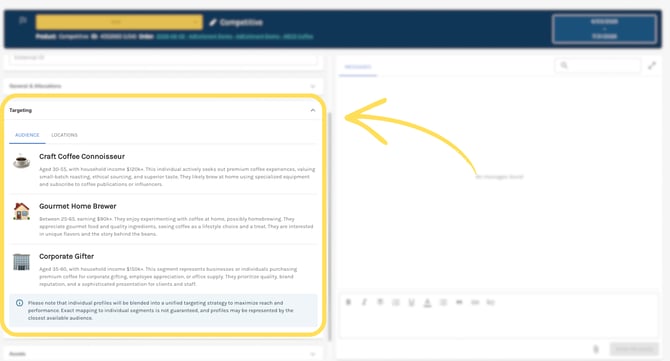
- For both Proposals and Orders, line items with audience targeting will no longer preselect audience segments based on the Advertiser’s industry. Users will now need to select audience segments for their line items manually.
- The line item History Log will now show when an Admin Override was used.
Fixed & Updated
- Users are now able to view the line items for which they are the Line Item Assignee without getting stuck in an infinite loop.
- Users are now able to download previous assets within a line item that had a start year of 2025 or earlier.
Proposals
New
- For both Proposals and Orders, line items with segment view/audience targeting will no longer preselect audience segments based on the Advertiser’s industry. Users will now need to select audience segments for their line items manually.
Fixed & Updated
- Product recommendations now require either a monthly or total budget.
- Users are now able to export Proposals into PDF and PowerPoint formats.
Reports
Fixed & Updated
- Exported PDF reports no longer have an extra blank page.
- Users are now able to access reporting for the Google Performance Max campaigns.
Admin
New
- Internal Only: Specific Support team members now have access to the new user creation workflow and new user automation
Fixed & Updated
- Users are now able to update their partner logos.
Products with no updates this sprint
- Advertising Products
- API Management
- Navigation
- Support