
Live chat is only available Monday-Friday, 8 a.m. to 5 p.m. MT.
CARL, our AI chatbot, is available 24-7!
How to Access the Chat
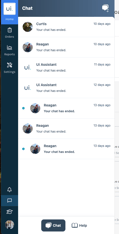
You can reach the chat widget in a few different ways:
-
Click the messaging icon on the left-hand side of Ui.Marketing.
-
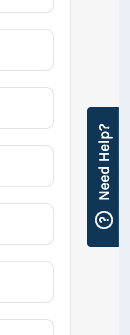
Click “Need Help” on the right-hand side, then select Help Center.
-
Go directly to the Help Center at support.ui.marketing.
AI Chatbot: Best Practices & Usage Guide
Overview
Our AI chatbot, CARL, is a great first stop for quick answers related to our software and advertising products. It’s designed to provide fast, helpful guidance.
Best Practices for Using the Chatbot
Ask Clear, Specific Questions
The clearer your question, the better the response.
✅ "How do I view Local SEO reporting?"
❌ "Help?"
Use Product-Related Keywords
Include terms like “ad specs,” “dashboard,” “reporting,” or “conversions.”
Start with the Chatbot for Common Questions
It’s ideal for FAQs and general inquiries that don’t require access to your account.
Review Provided Resources
If the chatbot links to articles or guides, check them out—they often have the fastest answers.
Ask to Transfer to Support
If the chatbot can’t help, you can request to be transferred to a live support agent.
Give Feedback
Please give a 👍 or 👎 on chatbot responses to help us improve.
Close the Chat Properly
When you're done, be sure to click the “That’s all” button to end the chat.
When to Use the AI Chatbot ✅
- For general questions about the software
- To learn about our advertising products or creative specs
- To get digital advertising best practices
- When looking for documentation or training materials
When to Transfer to Support 🚨
- If your issue is account-specific
- You’re not getting the help you need from the chatbot
- You need a live walkthrough or troubleshooting
- You prefer speaking with a person
- You need help taking a specific action